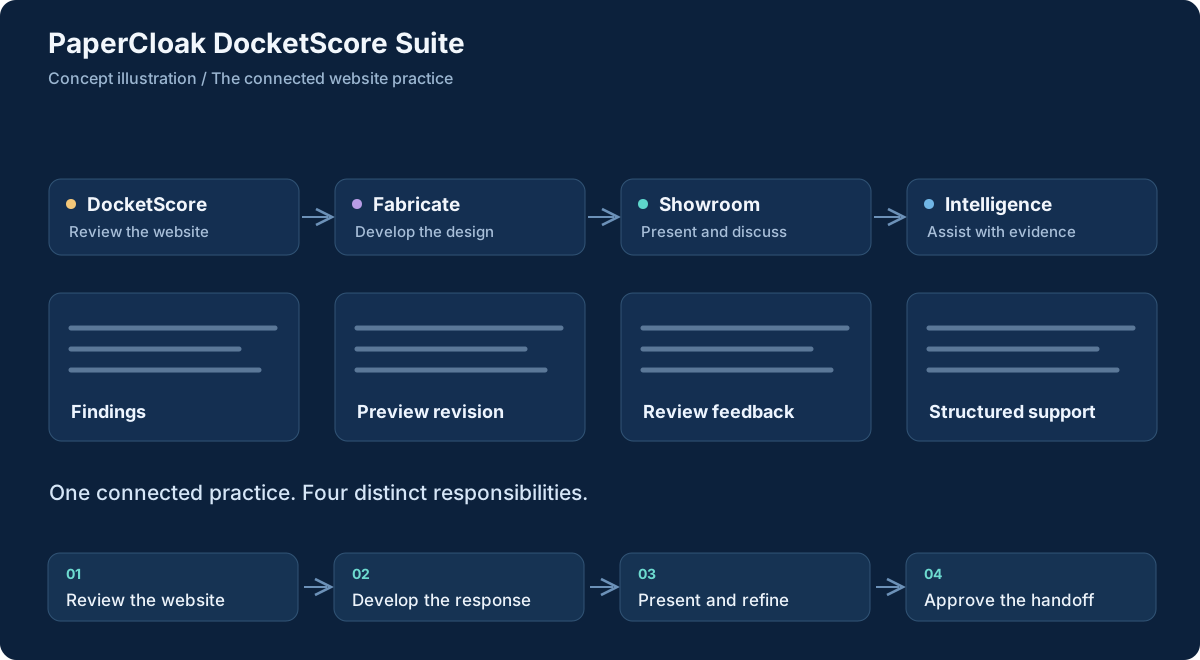
The suite describes how DocketScore, Fabricate, Showroom and Intelligence can cooperate while retaining their individual responsibilities.
A website review is useful when somebody can act on it. Findings need evidence, a design needs reasons for its choices and a client needs to inspect the result. Unrelated reports, mockups and messages can break the connection between the problem and its proposed solution.
The DocketScore Suite connects those handoffs. DocketScore reviews, Fabricate develops the production response, Showroom presents selected work and Intelligence supports structured reasoning. Each retains distinct responsibilities. The suite provides the larger picture without suggesting that an extra app already performs every step automatically.
What it is designed to do
The capabilities, in detail.
Carry evidence and decisions from the first website review to a considered redesign and a clear client-facing handoff.
Begin with reviewable observations
DocketScore's role is website review, scoring, evidence and reporting. Within the suite, a finding should be traceable to the page or observation behind it, with uncertainty visible. A score is a structured assessment under chosen criteria, not a certification or a substitute for the reviewer understanding the site's purpose and audience.
Turn findings into a design response
Fabricate provides the structured website-production direction: design jobs, templates, content, assets, previews and revisions. The intended handoff carries the rationale from review into production. Reusable foundations should help complete the work consistently while leaving room for a specific audience, visual direction and content that the owner can verify.
Present selected work clearly
Showroom supplies client-facing presentation and review. Reports, previews and feedback belong together when they describe the same proposed change. This boundary separates presentation from the design engine and working notes. The reviewer chooses which version is ready for another person to inspect.
Support reasoning without surrendering authority
Intelligence contributes structured validation and supporting analysis. Evidence, model output and approved decisions should remain distinguishable. Its shared runtime and the newer DocketScore pipeline are distinct implementation paths, not one universal engine through which every analysis already flows.
Make handoffs and approvals explicit
The documented integration direction uses clear events and release artifacts between components, with human review before external consequences. A preview being ready is different from a release being approved, published or communicated. Wider automated orchestration is a development direction and should be verified stage by stage rather than inferred from the existence of the child projects.
Workflow concept, illustrated. Select the graphic to open it at full size.
From input to useful result
How the work moves through.
01
Review the website
Gather relevant observations, assess the site against defined criteria and identify which findings are supported, uncertain or outside the review's scope.
02
Develop the response
Translate selected findings into a structured design job, content requirements and a preview that addresses the actual problem.
03
Present and refine
Bring the reviewed report and preview into Showroom, collect feedback and keep revisions tied to the version being discussed.
04
Approve the handoff
Inspect the intended release and audience before authorizing publication or communication. Availability and approvals remain specific to the actual workflow.
A concrete example
Carry the reason for a redesign into its presentation
A small organization has a website whose main service is difficult to find on a phone. A useful review records the relevant pages and navigation problems. The proposed response then changes hierarchy, content and page structure around that finding instead of offering a visually different site with no explanation of what improved.
A Showroom presentation can place the report beside the proposed experience so the owner can compare and respond. The production team checks the resulting content and functionality before any release. This illustrates the suite's intended connected workflow; it is not a claim that a fully automatic service currently completes every stage.
What comes out of the work
Results you can understand.
Connected review material
Findings and supporting observations that give a design response a clear starting point.
Reviewable production artifacts
Structured drafts, previews and revisions associated with a specific proposed improvement.
A deliberate client handoff
Selected reports and presentation releases with clear approval and feedback boundaries.
Built around
Principles that shape the product.
Review, production and presentation as separate responsibilities
Explicit handoffs and reviewable release artifacts
Human control over external publishing and communication
Connected work
A clear role in the family.
DocketScore supplies the review and Fabricate develops the design response.
No. It is the umbrella for related products and their workflow. DocketScore, Fabricate, Showroom and Intelligence retain separate roles and implementation boundaries.
Does it automatically publish and contact clients?
That broader automation appears in development plans. It is not presented as completed or universally enabled, and an internal plan is not approval for a particular publication or message.
Do all components have the same release status?
No. Source, prototypes and working presentation material exist at different levels. Each component and integration needs its own verification before a public availability claim is made.